31
Ping vs Bandwidth: Why Fast Internet Still Feels Slow
Bandwidth is capacity, latency is delay — and they cause completely different problems. Learn which one is behind your slow connection.
You pay for a 100 Mbps connection. Downloads fly. Video streams in 4K without a stutter. Yet your video calls lag, web pages take a second too long to appear, and every online game feels like you are half a step behind everyone else.
Nothing is broken, and upgrading your package will not help. You are running into latency, which is a completely separate measurement from the speed printed on your bill — and the one that actually governs how responsive the internet feels.
Two Different Measurements
The useful analogy is a road. Bandwidth is how many lanes it has. Latency is how long the journey takes.
Bandwidth is capacity — how much data can move per second, measured in megabits per second. It determines how quickly a large file downloads and what video quality you can stream without buffering.
Latency is delay — how long a single round trip takes, measured in milliseconds. It determines how quickly anything responds when you interact with it.
A sixteen-lane motorway between Karachi and Lahore moves an enormous volume of traffic, but a single car still takes the same number of hours to make the trip. Adding lanes does nothing for that car's journey time. This is exactly why upgrading from 50 Mbps to 200 Mbps changes nothing about your ping.
Which One Your Problem Actually Is
The symptoms are distinct once you know what to look for.
Bandwidth problems show up as video that buffers or drops to a lower resolution, large downloads that crawl, and everything slowing down when several people use the connection at once. The common thread is volume.
Latency problems show up as a delay between clicking and something happening, voice calls where people talk over each other, games where your shots register late, and pages that sit blank for a moment before appearing all at once. The common thread is responsiveness.
If a speed test reports the bandwidth you are paying for but the connection still feels sluggish, latency is your answer. A ping test measures it directly and takes a few seconds.
What Counts as Good Latency
Read these as bands rather than exact targets:
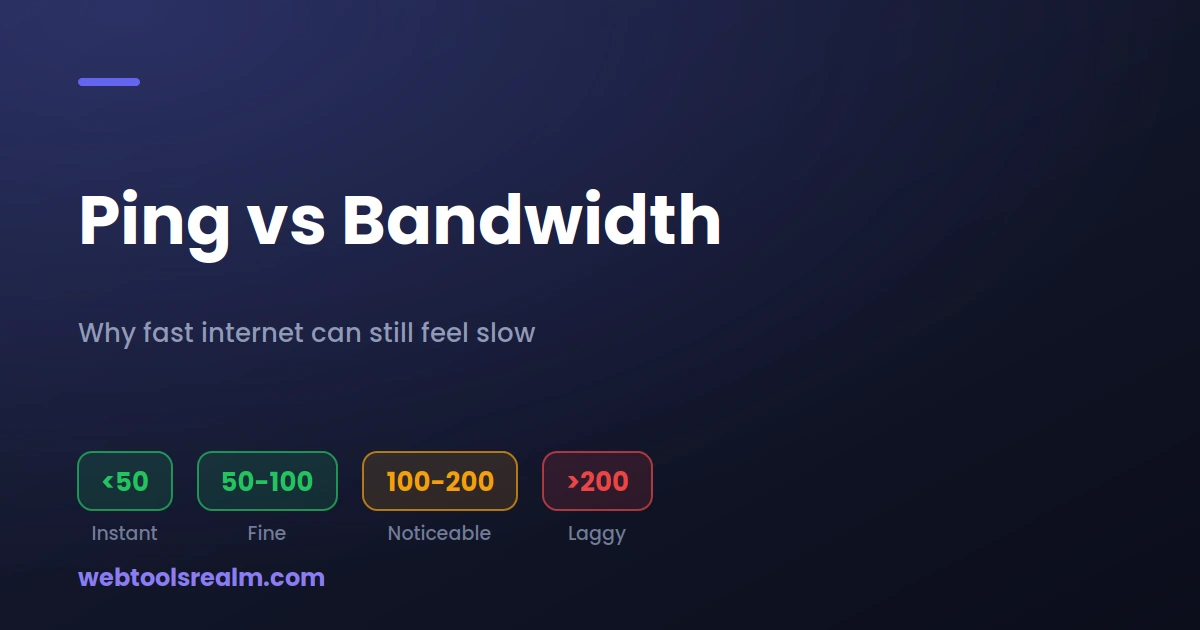
- Under 50 ms — Feels instant. Competitive gaming and video calls are comfortable.
- 50 to 100 ms — Fine for browsing, streaming, and most calls. Casual gaming is playable.
- 100 to 200 ms — Delay becomes noticeable in real-time use. Calls develop slight overlap; fast games feel unresponsive.
- Above 200 ms — Obvious lag in anything interactive, though downloads and streaming are unaffected because they buffer ahead.
These numbers are always relative to a destination. Pinging a server in your own city might return 15 ms while a server in the United States returns 250 ms, on the same connection. Neither result is wrong.
Distance Is Physics, Not a Fault
This is the part that surprises people most, and it is worth understanding because it sets a floor no amount of money can lower.
Data travels through fibre at roughly two-thirds the speed of light. Karachi to Frankfurt is around 5,500 km, which gives a theoretical minimum round trip of about 55 ms before any equipment is involved. In practice, routing rarely follows a straight line, and every router along the path adds a fraction of a millisecond. Real-world latency on that route typically lands between 120 and 180 ms.
If you are in Pakistan connecting to a US server, 200 to 300 ms is normal. Nothing is misconfigured. The distance is the cost.
The practical takeaway for anyone running a website: server location matters enormously for perceived speed. Hosting a site aimed at Pakistani visitors on a US server adds a fixed delay to every single request, and no amount of optimisation removes it. If you are choosing between hosting providers, run a ping test against each one's servers before committing.
What Actually Causes High Latency
- Distance and routing. The single biggest factor. Traffic sometimes takes a longer path than geography suggests.
- Connection type. Fibre is lowest, then cable, then DSL. Satellite is in a different league — traditional geostationary satellite adds 500 ms or more purely from the trip to orbit and back.
- Wi-Fi versus Ethernet. Wi-Fi typically adds 2 to 10 ms, and considerably more with interference or distance from the router. For gaming and calls, a cable is a genuine upgrade.
- Network congestion. Your ISP's infrastructure gets busy at peak hours. Latency rising every evening is a strong signal.
- Router load. Cheap routers struggle when many devices are connected, adding delay before your traffic even leaves the house.
- Server load. An overloaded destination server responds slowly regardless of how good your connection is.
Jitter and Packet Loss
Two related measurements that often matter more than the ping number itself.
Jitter is variation in latency. A connection that consistently returns 80 ms feels better than one bouncing between 30 ms and 200 ms, even though the second has a lower best case. Voice and video calls are particularly sensitive to jitter — it is what causes audio to break into fragments.
Packet loss is data that never arrives and has to be sent again. Even 1 to 2 percent loss causes noticeable problems in real-time applications. This is frequently the real culprit when a connection tests fine but feels unreliable.
A single ping test gives you a snapshot. If you suspect jitter, run the test several times and compare the spread rather than looking at any one result.
How to Actually Reduce Latency
In rough order of how much difference they make:
1. Use a cable instead of Wi-Fi. The cheapest and most reliable improvement available.
2. Choose a closer server. In games, pick the nearest region. For hosting, pick a data centre near your visitors.
3. Reduce competing traffic. A large download or cloud backup running in the background adds delay to everything else.
4. Restart your router. Genuinely helps when the router has been running for weeks and its memory is fragmented.
5. Change your DNS resolver. This does not reduce latency to the server, but it does reduce the time spent looking up addresses, which makes browsing feel faster.
6. Switch connection type. If you are on DSL or satellite and fibre is available, that is the real fix.
Note what is absent from this list: upgrading your bandwidth package. It will not help.
Does a VPN Increase Latency?
Almost always, yes. Your traffic now travels to the VPN server first and then onward to its destination, which is a longer path by definition. Expect an increase of 10 to 50 ms for a nearby server, and considerably more for one on another continent.
The exception is rare but real: if your ISP routes traffic to a particular destination badly, a VPN can occasionally take a shorter path and reduce latency. It is worth testing rather than assuming, but do not expect it.
Frequently Asked Questions
Why is my ping high when my internet speed is fast?
Because they measure different things. Bandwidth is capacity; latency is delay. A high-capacity connection can still have poor latency if the server is far away, the route is congested, or you are on Wi-Fi rather than a cable.
Will upgrading my internet package reduce ping?
Usually not. Extra bandwidth does not shorten the physical distance or reduce the number of hops. The exception is if your current connection is saturated — in that case, congestion is adding delay, and more capacity does help.
What is a good ping for gaming?
Under 50 ms is ideal for competitive play. Up to 100 ms is playable for most games. Above 150 ms, fast-paced games feel unresponsive regardless of your download speed.
Why does my ping change throughout the day?
Network congestion. Your ISP's infrastructure carries more traffic during peak hours, which adds queuing delay. A consistent evening spike is a strong signal that congestion, not your equipment, is responsible.
Does distance really matter that much?
Yes, and it is a hard physical limit. Data cannot travel faster than light through fibre, so a server on another continent will always have higher latency than one nearby. This is why content delivery networks exist — they place copies of content closer to visitors.
The Short Version
Bandwidth is capacity; latency is delay. If video buffers, you need more bandwidth. If everything feels a beat behind, you need lower latency — and the fixes are different. Measure before you spend, because the most common response to a latency problem is paying for bandwidth that was never the issue.
If the site you are testing is not responding at all rather than responding slowly, our guide on telling the difference between a real outage and a local problem covers that case, and a website status checker will confirm whether the server is up.
Written by Baleeghuddin Shaikh, SEO consultant with 8 years of experience in technical SEO and site diagnostics.
Contact
Missing something?
Feel free to request missing tools or give some feedback using our contact form.
Contact Us